
This guide covers checking the gap between the vibrating plate and the chute. It is Step 5 of the Pearl Mini Uncrate & Assembly Guide.
| Estimated Time | 5 minutes |
| People Required | 1 |
| Difficulty | Easy |
| Tools Required | Measuring tape or ruler, adjustable spanner |
Before You Start
This step should only be carried out after both sets of shipping brackets have been removed. If you haven't done that yet, head back to Removing the Pearl Mini Shipping Brackets first.
If your Pearl Mini arrived with the hopper already attached, skip this step and head to Levelling your Pearl Mini.
Step 1 — Measure the Gap
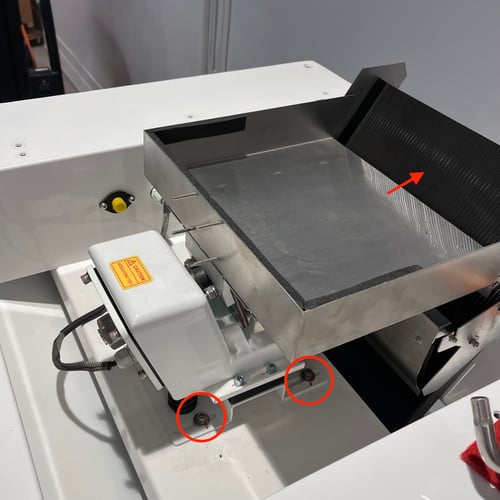
On top of the machine, locate the vibrating plate — the flat surface that coffee passes over during sorting. Using a measuring tape or ruler, measure the gap between the vibrating plate and the chute below it.
The gap should measure between 2.5cm and 3.5cm.
If the gap falls within this range, no adjustment is needed — head straight to What's Next.
Step 2 — Adjust the Plate if Needed
If the gap is outside the 2.5–3.5cm range, you'll need to adjust the position of the vibrating plate.
Using an adjustable spanner, slightly loosen the four screws at the base of the vibrating plate. Do not fully remove the screws — the backing plate behind them will drop into the machine if they come out completely.
With the screws loosened, gently push the vibrating plate by hand until the gap measures between 2.5cm and 3.5cm. Once in the correct position, tighten the four screws back up firmly.
Re-measure the gap to confirm it is still within range before moving on.
What's Next
If your hopper is already attached, skip ahead to Levelling your Pearl Mini.
Otherwise, head to Attaching the Pearl Mini Hopper to continue with your assembly.