
This guide covers lifting and fitting the hopper in the correct orientation. It is Step 6 of the Pearl Mini Uncrate & Assembly Guide.
| Estimated Time | 10 minutes |
| People Required | 2 minimum — 3 if no forklift is available |
| Difficulty | Advanced |
| Tools Required | Forklift with lifting straps (recommended), or platform or step ladder high enough to safely guide the hopper into position |
Before You Start
If your Pearl Mini arrived with the hopper already attached, skip this step entirely and head to Levelling your Pearl Mini.
Read this section carefully before lifting the hopper. Your technician cannot complete commissioning if the hopper is fitted in the wrong orientation. If you are unsure at any point, contact Technical Service before proceeding, it is much easier to get this right now than to correct it later.
The hopper weighs approximately 30kg. A forklift with straps is the recommended method, but three people and a platform or step ladder raised to a safe and comfortable working height is an acceptable alternative.
Step 1 — Identify the Front and Back of the Hopper
The hopper has a front and a back. Before lifting it, take a moment to identify which side is which:
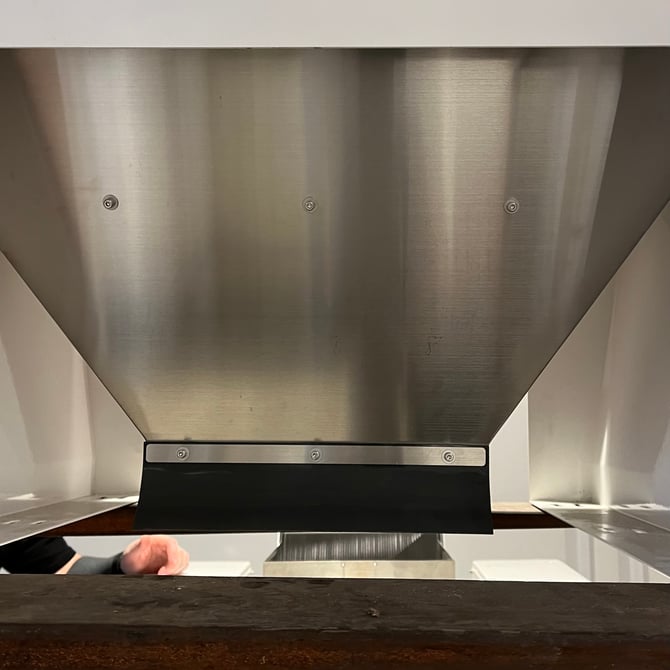
- Front of the hopper (faces the front of the machine, towards the SOVDA logo): small metal strip with three fixed screws
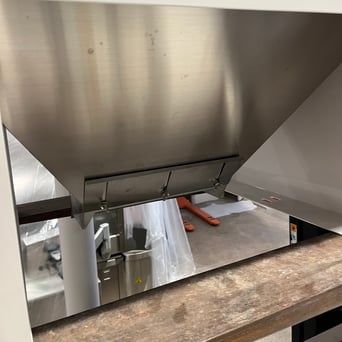
- Back of the hopper (faces the rear of the machine, towards the chute): larger plate with three adjustable wing nuts
Make sure everyone involved in the lift is clear on the correct orientation before you begin.
|
Front of the hopper |
Back of the hopper |
Step 2 — Lift the Hopper into Position
Using a forklift with lifting straps, or three people and a platform or step ladder, carefully lift the hopper to the top of the Pearl Mini.
Do not slide the hopper into position. It must be lifted clear of the vibrating plate and lowered straight down from above. Sliding the hopper risks damaging the vibrating plate underneath.
Step 3 — Check the Orientation and Clearances
Before securing the hopper, confirm all of the following:
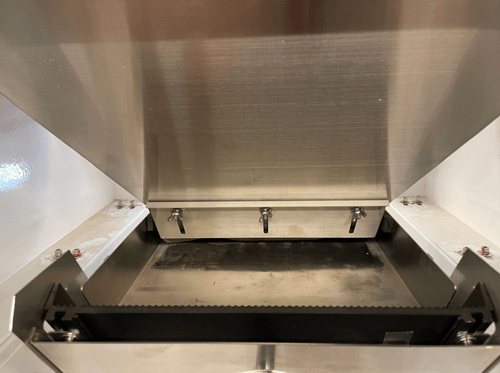
- The wing nuts and back plate are facing the rear of the machine
- The bolt holes in the machine body are visible through the hopper's mounting slots
- There is 5–10mm of clearance between the vibrating plate and the hopper outlet on the left, right and front of the machine
If anything doesn't look right, lift the hopper clear and reposition before continuing.
Step 4 — Secure the Hopper
Using hand tools, work your way evenly around the 12 machine screws in the accessories box to secure the hopper to the Pearl Mini — a little at a time on each screw rather than fully tightening one before moving to the next. This ensures the hopper sits flat and evenly.
Do not use a power tool. This will damage the threads and may cause the screws to break, which are difficult and costly to replace.
What's Next
Head to Levelling your Pearl Mini to continue with your assembly.