
| Estimated Time | 1.5 hours |
| People Required | 2 minimum (3 recommended for hopper installation without a forklift) |
| Difficulty | Advanced |
| Tools Required | Forklift (rated 500kg+), lifting straps or slings (500kg+), step-ladder, 6mm hex key, 5mm hex key, adjustable spanner, socket set, drill or impact driver, crowbar or pry bar, mallet, spirit level, measuring tape, safety gloves, steel-toe boots, eye protection, hard hat |
Before You Begin
Congratulations on your Pearl Mini, you're nearly there! Before you start, there are a couple of important things to note.
Newer Pearl Mini models: Some newer Pearl Mini machines ship with the hopper already attached. If yours does, you can skip Step 5 and 6.
Read this guide in full before starting. Some steps depend on decisions made earlier in the process, for example, the orientation of the hopper must align with the lift before the machine is fully assembled. Getting this wrong may mean partially disassembling the machine to correct it.
If at any point you are unsure or uncomfortable, stop and contact Technical Service before continuing.
What's in the Crate
Once you've opened the crate, you should find the following:
- Pearl Mini body
- Pearl Mini hopper
- Pearl Mini base (if ordered)
- Accessories box (contains the feet, fixings and air line fitting)
Remove and organise everything except the Pearl Mini body — keep it in the crate until you're ready to lift it. Use the bubble wrap and packing materials to protect the paintwork while you work.
Step 1 — Open and Uncrate the Pearl Mini
Estimated time: 10 minutes - 2 people recommended
For a dedicated guide to this step, see Opening and Uncrating your Pearl Mini.
The Pearl Mini ships in a wooden crate with a removable top panel. Using an 8mm nut driver, remove the screws around the edges of the top panel. There may also be nails on some crates, if so, use a crowbar and hammer to wedge under the panel and work from corner to corner until it comes loose. The lid can then be tilted up to release any remaining fixings.
Once the lid is off, photograph the inside of the crate before touching anything — this is important if you need to make a damage claim later.
Next, remove one of the side panels. Using an 8mm nut driver, remove the screws around the edges. If there are nails, use a crowbar to release the brackets at each corner. This is easiest with two people, one to hold the panel and one to work. Once all fixings are removed, carefully lift the panel away.
Take a moment to check the machine and all items for any damage, and make sure everything on your packing list is present. If anything is missing or damaged, contact Technical Service within 48 hours of delivery.
Step 2 — Assemble the Base
Estimated time: 10 minutes | 2 people recommended
For a dedicated guide to this step, see Assembling the Pearl Mini Base.
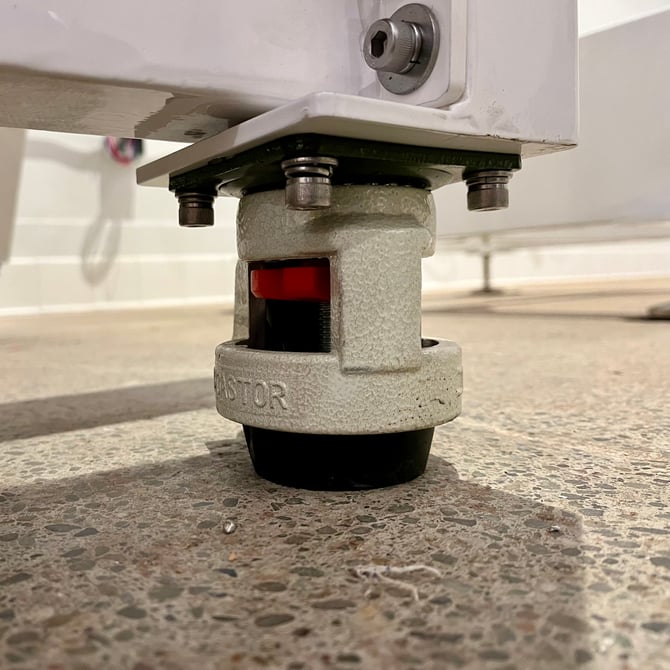
If your Pearl Mini includes a base, it may arrive with wheels already fitted. We recommend swapping these out for the four threaded feet found in your accessories box, they provide better stability and allow you to adjust the height precisely.
 |
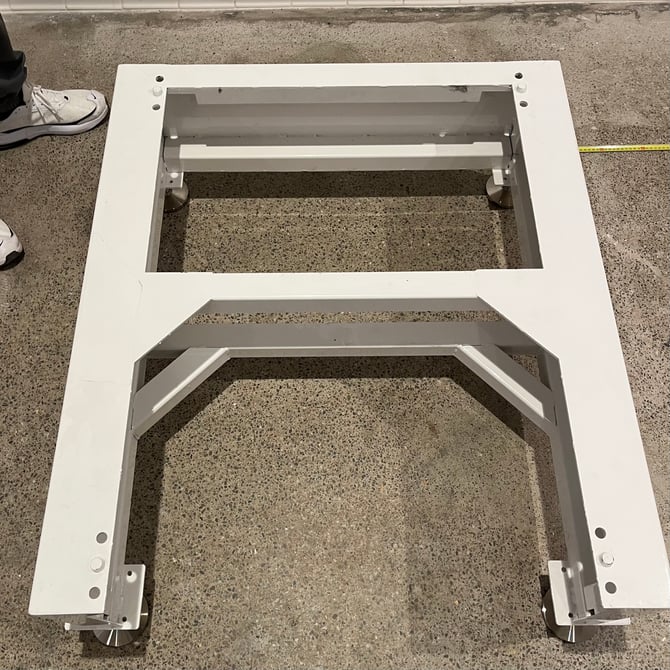 |
Screw the feet approximately 3–4cm into the base. Place the base as close as possible to where you want the Pearl Mini to live permanently, leaving enough space to manoeuvre the machine in from the crate using the forklift.
The open side of the base is the front of the machine, make sure this is facing the right direction before you go any further.
Use a spirit level to check the base is level on all sides, adjusting the feet as needed. Once level, tighten the locking nuts firmly against the base to hold everything in place.
Step 3 — Lift and Position the Pearl Mini
Estimated time: Up to 30 minutes | 2–3 people and a forklift
For a dedicated guide to this step, see Lifting and Positioning the Pearl Mini.
⚠️ The Pearl Mini weighs up to 462kg. This step requires a forklift and lifting straps rated for at least 500kg. Attempting to lift the machine incorrectly risks serious injury or death. Do not proceed without the correct equipment.
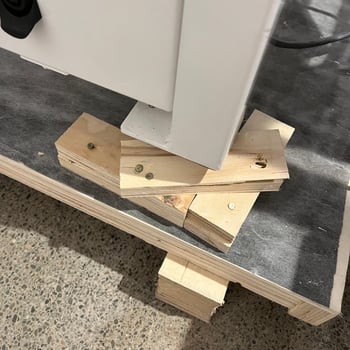
At the base of the machine inside the crate, you'll find wooden blocks holding the Pearl Mini in place. Using a drill or impact driver, remove the screws and take the blocks away. There may also be nails — use a crowbar to remove these. Do not use power tools anywhere else on the machine, only for removing the crate fixings.
Thread your lifting straps through the hooks on the Pearl Mini and attach them securely to the forklift. If available, use extended forklift arms to keep the machine clear during the lift.
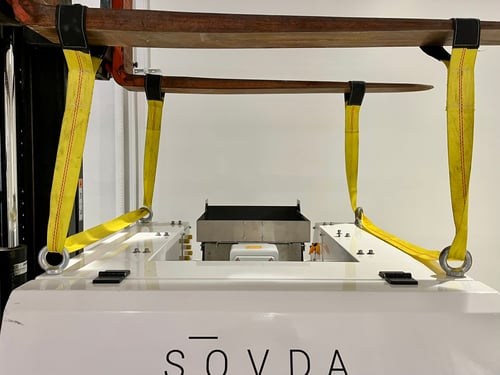
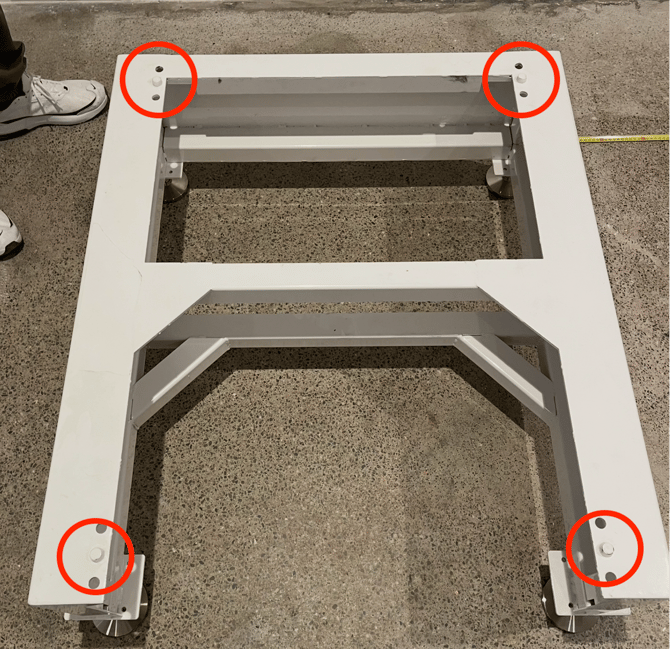
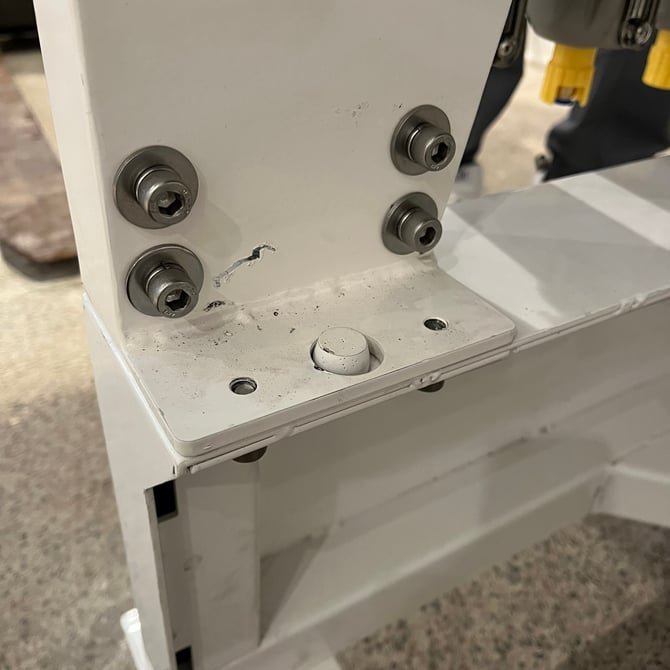
Raise the Pearl Mini around 5cm and slide the crate floor out from underneath. Then carefully manoeuvre the machine over the base and lower it slowly into position, making sure the four lips on the base slot into the corresponding holes on each corner of the body.
 |
 |
Step 4 — Remove the Shipping Brackets
Estimated time: 5 minutes | 1 person
For a dedicated guide to this step, see Removing the Pearl Mini Shipping Brackets.
Your Pearl Mini ships with two sets of protective brackets fitted to keep parts safe during transit. Both must be removed before use.
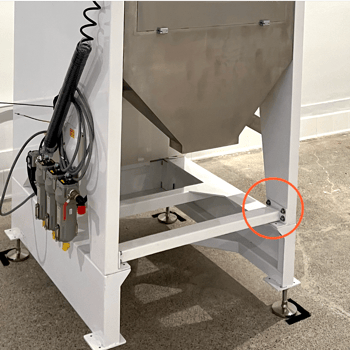
Central support bracket
Locate the central bracket on the front of the machine. Using a 6mm hex key, remove the bracket and refit the screws once it's been taken off. You may need a mallet to remove the bar.
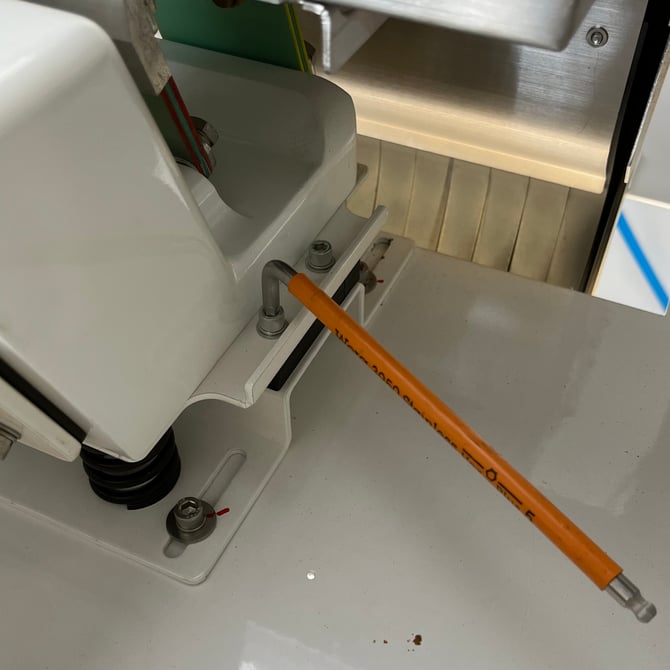
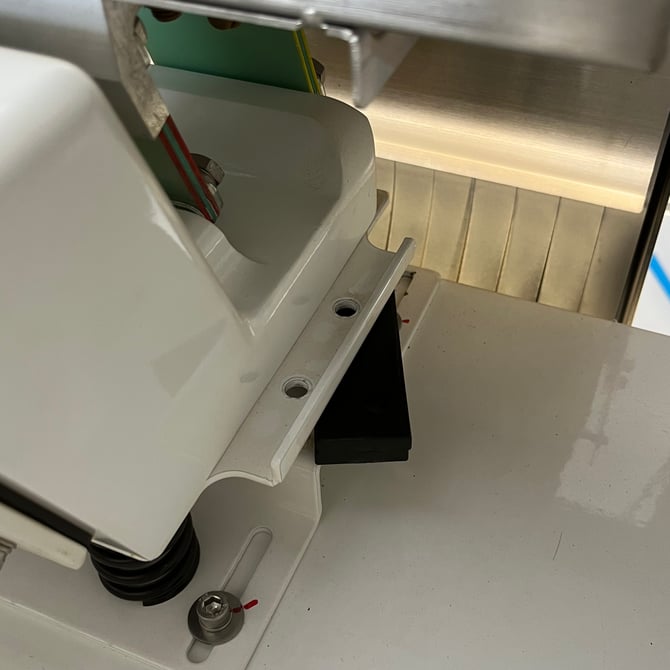
Vibrating motor supports
On top of the machine you'll find the vibrating motor, this is the component that moves coffee across the sorting plate. On either side of the motor, you'll find a small black rectangular support wedged in place to protect it during shipping.
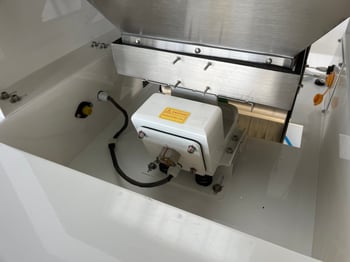
Using a 5mm hex key, remove the two screws on one side and take out the black support piece. Repeat on the other side. You should remove two supports in total.
 |
 |
Step 5 — Check the Vibrating Plate Position
Estimated time: 5 minutes | 1 person
For a dedicated guide to this step, see Checking the Pearl Mini Vibrating Plate Position.
If you have a newer Pearl Mini, your hopper may already be attached. If this is the case, skip to step 7.
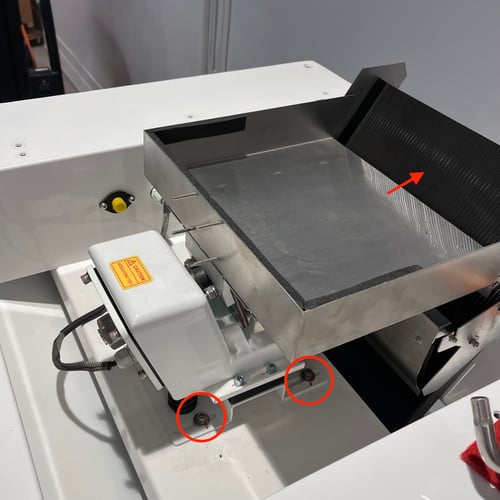
Once the supports are removed, check the gap between the vibrating plate and the chute below it. This should measure between 2.5cm and 3.5cm.
If the gap falls outside this range, slightly loosen, but do not fully remove, the four screws at the base of the vibrating plate and adjust its position. Fully removing the screws will cause the backing plate to drop inside the machine.
Step 6 — Attach the Hopper
Estimated time: 10 minutes | 2 people minimum, 3 without a forklift
For a dedicated guide to this step, see Attaching the Pearl Mini Hopper.
⚠️ Read this section carefully before starting. Your technician cannot complete commissioning if the hopper is fitted in the wrong orientation. If you are unsure, contact Technical Service before proceeding — it is much easier to get this right now than to correct it later.
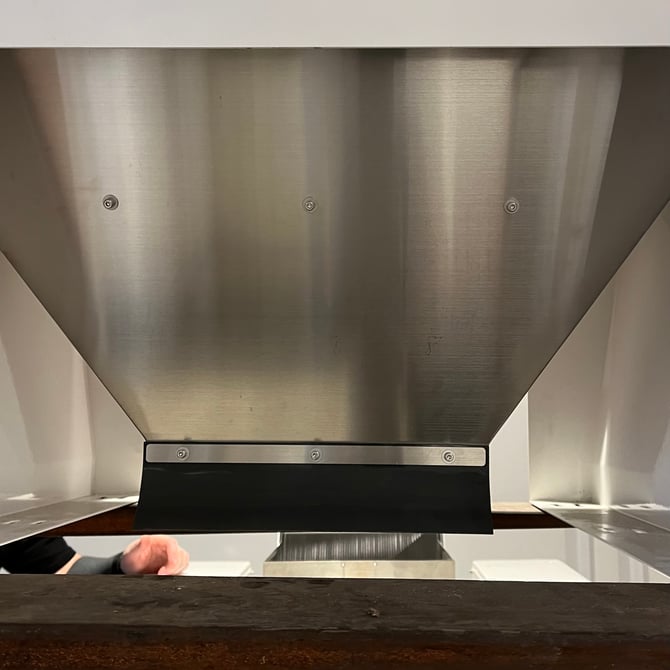
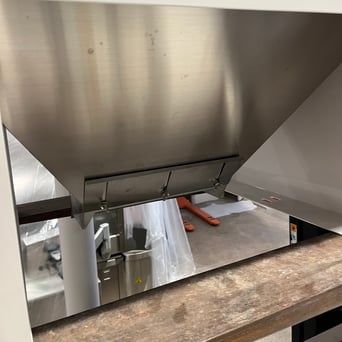
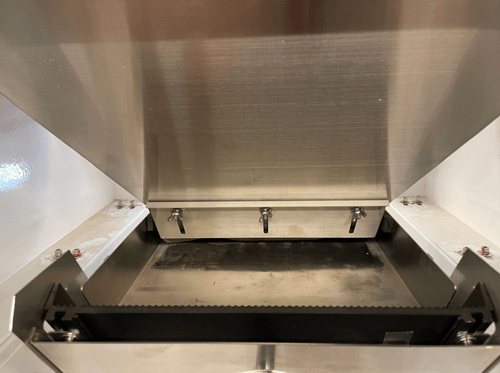
The hopper has a front and a back, and it must be installed the right way around:
- Front of hopper (faces the front of the machine, towards the SOVDA logo): small metal strip with three fixed screws
- Back of hopper (faces the rear of the machine, towards the chute): larger plate with three adjustable wing nuts
|
Front of the hopper |
Back of the hopper |
Using a forklift with straps, or at least three people, lift the hopper carefully onto the top of the Pearl Mini. Do not slide the hopper into position, it must be lifted clear of the vibrating plate and lowered straight down.
Once in position, check the following before securing:
- The wing nuts and back plate are facing the rear of the machine
- The bolt holes in the machine body are visible through the hopper's mounting slots
- There is 5–10mm of clearance between the vibrating plate and the hopper outlet on the left, right and front
Using hand tools only, secure the hopper using the machine screws from your accessories box. Do not use a power tool, this will damage the threads and may cause the screws to break.
Step 7 — Level the Pearl Mini
Estimated time: 5 minutes | 1 person
For a dedicated guide to this step, see Levelling your Pearl Mini.
Loosen the locking nuts on all four feet.
Using a spirit level, adjust the front feet until the machine is level left to right. Then adjust the rear feet until the machine is level front to back.
⚠️ Always level by lowering the high side, not raising the low side. Over-extending the feet can cause the threads to disengage, which may cause the machine to fall and result in a fatal accident.
Double-check all sides are level, then tighten all locking nuts firmly against the base.
Step 8 — Connect Air and Power
Estimated time: 15 minutes | 1 person (assumes your main air line is already installed)
For a dedicated guide to this step, see Connecting Air and Power to your Pearl Mini.
Power
Your Pearl Mini does not come with a plug fitted. You will need to source and fit a plug that matches your wall outlet. If you are in North America and using a step-up transformer, the plug must match the outlet on the transformer, not the wall socket. If you are unsure of your electrical requirements, check the Site Preparation Guide or contact a qualified electrician.
Air
Take the air line fitting from your accessories box and screw it into the air filter on the left-hand side of the machine. Connect your air line from the fitting to your shut-off valve.
⚠️ Important — please read before connecting air. Air line installation and connection must comply with all local laws, regulations and safety standards in your country or region. If you are not comfortable or qualified to do this work, please contact a qualified tradesperson. Do not connect air if your compressor does not have a refrigerated dryer or air filter fitted — running unfiltered air through the Pearl Mini will void your warranty.
What's Next
With everything assembled and connected, your Pearl Mini is ready. Head to When Will My Pearl Mini Be Commissioned? to find out the next steps and how to schedule your technician visit.
If anything doesn't look right or you've hit a problem during assembly, contact Technical Service, it's always better to check before your technician visits than to discover an issue on the day.