
| Estimated Time | Up to 30 minutes |
| Difficulty | Intermediate |
| Tools Required | Compressed air gun, 8mm socket for the front hatch (Check 6 only) |
What You'll Notice
Your Pearl Mini is rejecting much more coffee than usual, and the reject pile is full of beans that look perfectly good. You might hear the ejectors, the small air jets that push defective beans out of the stream, firing almost constantly. It can sound like an air leak. It may have started suddenly, or crept up over a few days.
Work through the checks below in order. Most high rejection rates are fixed by one of the first few.
Before You Begin
⚠️ Do not put your hands inside the sorting chamber while the dust cleaning settings are active. The wiper can move at any time and may cause injury. Set both dust cleaning times to 0 before reaching inside. See Managing the Dust Cleaning Settings.
⚠️ Do not open the camera hatches. Your cameras were calibrated by your Technical Brand Ambassador, and opening the hatches can knock them out of calibration.
If at any point you are unsure or uncomfortable, stop and contact Technical Service before continuing.
Check 1 — Acceptance Range
The acceptance range is the setting that decides how far a bean's colour can be from your target before the Pearl Mini rejects it. If it is set too tight, good coffee gets rejected along with the defects.
Go to Sensitivity Regulation and increase the acceptance range number a little, so the machine accepts a slightly wider range of colour. Run a small batch and check the reject pile again. The front and back cameras have separate settings on the F and B tabs, so check both.
For more on how the acceptance range works, see the Pearl Mini User Manual.
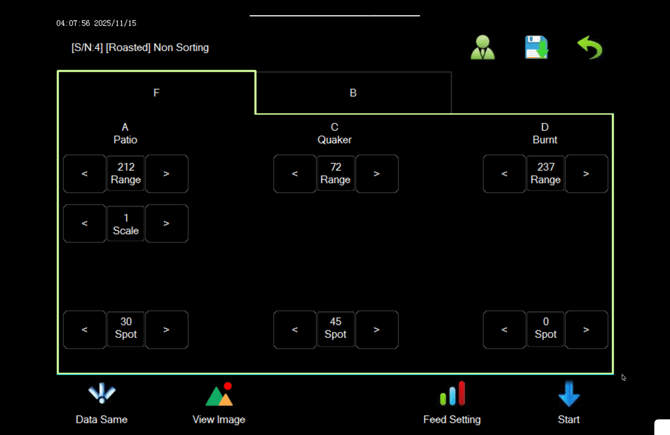
If the reject pile now looks right, you're done. If you have already set the acceptance range well above normal and the Pearl Mini is still rejecting good coffee, the setting is not the cause. Return it to your usual value and continue to Check 2.
Check 2 — Air Pressure
The ejectors need the right air pressure to fire cleanly. Too much pressure can blow good beans into the reject chute along with the defect.
Find the air regulator on the left-hand side of the Pearl Mini, where your air hose connects. It has a blue dial. Check that the gauge reads 0.4MPa.
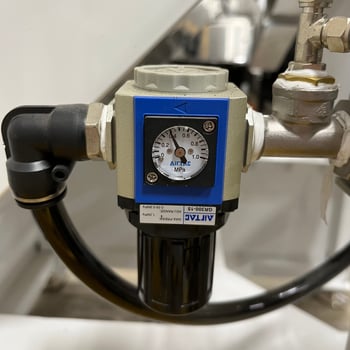
If it doesn't, adjust the regulator until the gauge reads 0.4MPa. For a dedicated guide to this step, see Adjusting your Air Regulator.
If the gauge won't reach 0.4MPa however you adjust it, your compressor may not be supplying enough air. See Pearl Mini Air Compressor Requirements.
If the pressure was wrong and the rejection rate is now normal, you're done. If not, continue to Check 3.
Check 3 — Leaking or Blocked Ejectors
A leaking ejector blows a constant stream of air, knocking good beans out of the flow even when nothing is wrong with them.
Stop the Pearl Mini from sorting. Open the window into the sorting chamber and listen. A working machine should be quiet when it isn't sorting. If you can hear a steady hiss of air, one or more ejectors is leaking.
If you can hear a leak, see Fixing Stuck or Leaking Pearl Mini Ejector.
If you can't hear any leaks, continue to Check 4.
Check 4 — Camera Windows
The cameras look at your coffee through glass windows. If the windows are dusty, the cameras see every bean as the wrong colour and reject it.
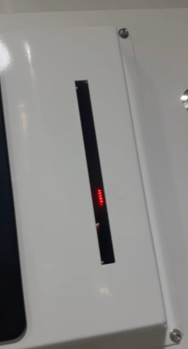
Check the red lights first. Look at the red LEDs next to the screen. These light up when the cameras see something they want to reject, which tells the ejectors to fire. If they are lit while no coffee is passing, the cameras are seeing something that isn't there, such as light reflecting off dust on a window.
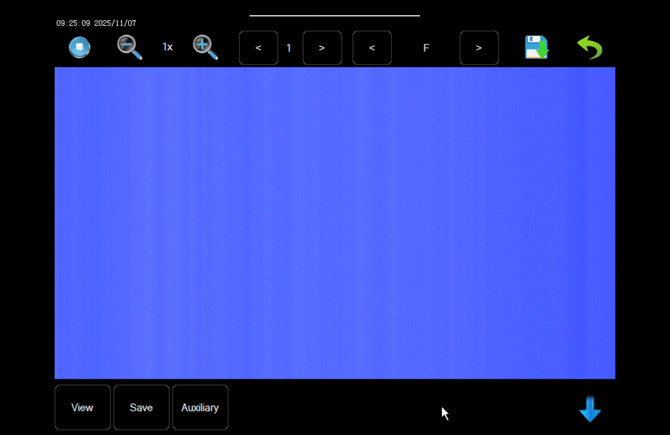
Then check the camera images. With the machine stopped, go to Sensitivity Regulation and press View Image. You should see an even blue background. A little white is fine, but not much.
Press the right arrow next to F to switch to the back camera and check that one too.
If either image shows a white gradient or fade, the windows need cleaning. You can do this in two ways.
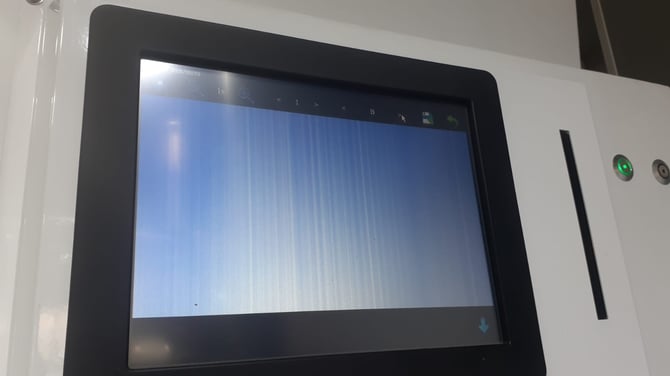
Manual cleaning. Go back to the main menu, open the dust cleaning settings and press Manual Cleaning. This runs the wiper across the windows. Repeat it a few times.
Compressed air. Blow compressed air inside the sorting chamber window to clear the dust. Be careful not to aim it up the chute, as the Teflon fins damage easily.
Check View Image again for both cameras. If the background is now an even blue and the rejection rate is normal, you're done. If not, continue to Check 5.
Check 5 — Teflon Fins
The Teflon fins are the thin strips inside the chute that hold the beans flat as they slide down to the cameras. A bent, stuck or broken fin can flick beans out of the stream before they reach the end of the fin, so they land in the reject chute.
Look inside the chute and check that every fin lies flat against it, with none stuck, broken or damaged.
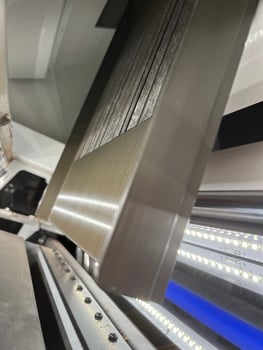
If any fin is damaged, contact Technical Service to order a replacement. If all the fins look good, continue to Check 6.
Check 6 — Separation Plate
The separation plate sits at the front of the machine and divides the good coffee from the rejected coffee. It can get nudged forward by accident when someone cleans the front section. If it has moved, good coffee falls on the wrong side of it.
How to tell. Turn off all the sorting sensors, then run some coffee.
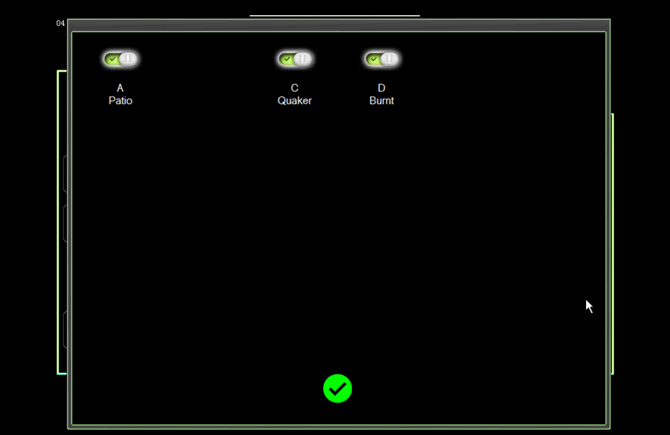
- Go to Sensitivity Regulation and tap the header at the top of the sorting settings. It shows the name of the sort, such as Patio, Black, White, Quaker, Red, Green or Burnt.
- A page of toggles opens. Switch all of them off. The header will now read NULL.
- Press the B tab to switch to the back camera, and do the same. The two cameras are set separately, so both must read NULL.
 |
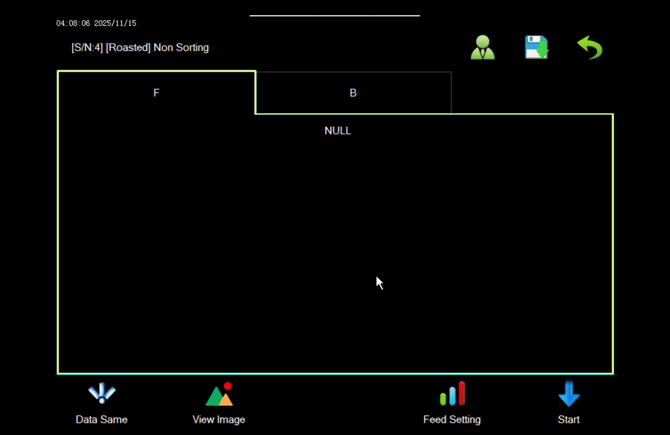 |
If the Pearl Mini still rejects coffee with every sensor off, the separation plate has almost certainly moved.
How to fix it
⚠️ Stop the Pearl Mini before opening the front hatch
Use a small socket to open the front hatch. Inside you'll see the separation plate. Using your 8mm socket, loosen the nut both sides, take hold of it and pull it towards you.
Close the hatch, then contact Technical Service and we'll talk you through setting the plate in exactly the right position.
Turning sorting back on. Tap Null on each camera to open the toggle page again, and switch your sorting settings back on.
Still Not Working?
Contact Technical Service and we'll help you find the cause. To save time, please include:
- Your Pearl Mini's serial number
- Which sorting profile you're using, and your acceptance range values for the front and back cameras
- A photo of the View Image screen for both cameras
- A photo of the air regulator gauge
- A photo of your reject pile, and a short video of the machine sorting
- Which of the checks above you have already worked through