
| Estimated Time | Up to 15 minutes |
| Difficulty | Easy |
| Tools Required | None |
What You'll Notice
Your SOVDA Blend won't start, or won't run a blend, even though it is plugged in and set up. This usually happens straight after installation, or after the machine has been moved or switched off for a while.
Work through the checks below in order. Most of these are quick to fix.
Before You Begin
⚠️ Never reach into the blending chamber while the machine has power or air connected. Moving parts inside can cause serious injury.
If at any point you are unsure or uncomfortable, stop and contact Technical Service before continuing.
Check 1 — Air Pressure
The SOVDA Blend needs compressed air to run. Open the front cabinet and find the air regulator at the bottom. Check that it is set to 0.4MPa.
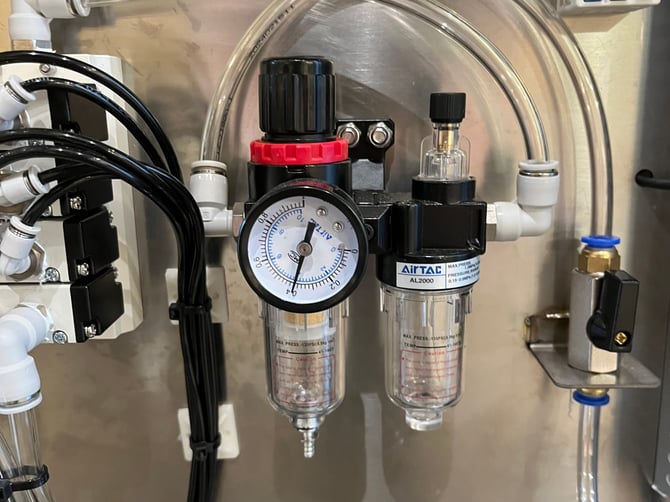
If it isn't, adjust it to 0.4MPa. For a dedicated guide to this step, see Adjusting your Air Regulator.
If the Blend now starts, you're done. If not, continue to Check 2.
Check 2 — Emergency Stop
The emergency stop button on the front of the machine is sometimes pressed in during shipping. If it is pressed in, the Blend will not start.
Twist the button to release it.
If the Blend now starts, you're done. If not, continue to Check 3.
Check 3 — Breakers
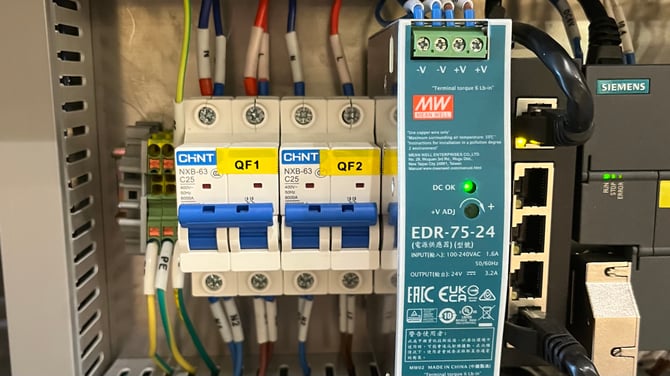
There are two blue breakers inside the front cabinet. If either has tripped, the Blend will not have power.
Open the front cabinet by lifting and twisting the handle, and check both blue breakers are switched on. If one is off, switch it back on.
⚠️ Only touch the two blue breakers. Do not touch any wiring or other components inside the cabinet. If a breaker trips again straight away, leave it off and contact Technical Service.
If the Blend now starts, you're done. If not, continue to Check 4.
Check 4 — Lid
The Blend will not run unless the lid is fully closed. Check the lid is shut properly and nothing is stopping it from closing.
If the Blend now starts, you're done. If the lid is fully closed and the Blend still won't start, the lid sensor may be faulty. This has affected some units. Contact Technical Service and we'll help you test it.
Check 5 — Pressure Settings
The SOVDA Blend uses a pressure sensor to manage the loader, the part that lifts beans into the blending chamber. If the sensor reading is wrong, the Blend may not load or start.
Go to Settings, then Pressure Settings, and look at the Current Pressure reading. It should be between -1kPa and 0kPa.
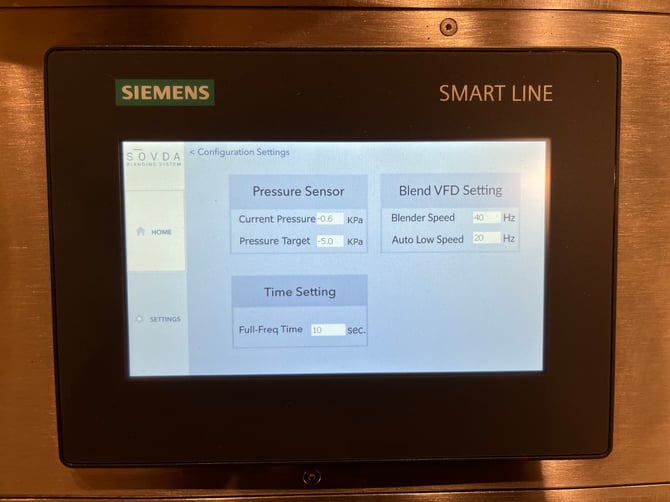
⚠️ Do not change any of the values on the Pressure Settings screen. These should only be adjusted if Technical Service asks you to.
If the reading is outside this range, there may be a problem with the sensor. Contact Technical Service.
Still Not Working?
Contact Technical Service and we'll help you get running. To save time, please include:
- Your SOVDA Blend's serial number
- A photo of the air regulator gauge
- A photo of the Pressure Settings screen showing the Current Pressure reading
- A photo of any message on the screen
- Which of the checks above you have already worked through