
When to Recover Factory Settings
Recovering factory settings restores your machine's configuration to its original state. This is typically used as a last resort when the machine is behaving unexpectedly and all other troubleshooting steps have been exhausted.
⚠️ Before you begin: Recovering factory settings will erase your current recipes and configuration values. Make a note of any recipe settings you want to keep before proceeding.
How to Recover Factory Settings
- From the Home Screen, tap System Settings and enter the password (default: 0 or 000000)
- Tap System
⛔ Do Not Use the Reset Buttons
Warning: Under no circumstances should you tap or use the Reset option on the machine. Reset performs a full software wipe. This is not the same as recovering factory settings and can leave the machine inoperable, requiring a software reinstall.
Always use Backup/Recover → Recover as described below.
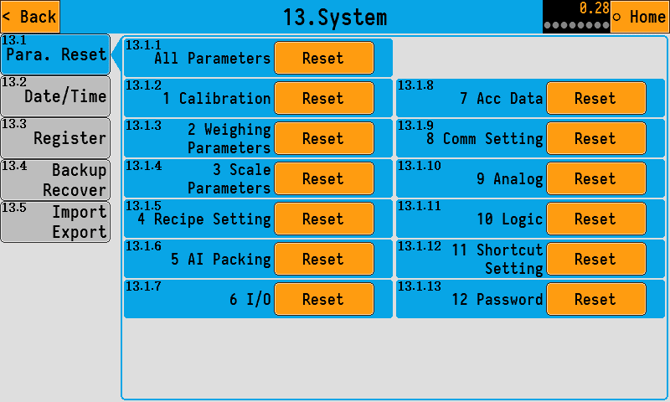
- Tap Backup/Recover on the sub-menu
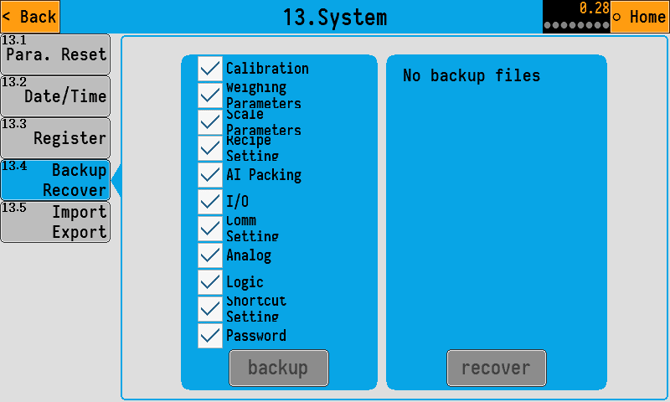
- Tap Recover
- If you recover option is greyed out, please get in touch with support for further information.
The machine will restore its factory configuration. Once complete, you will need to set up your recipes again from scratch. Refer to the How to Create and Modify a Recipe guide to get back up and running.