
Calibration
Your Precision Fill was calibrated during production, however we recommend re-calibrating your machine to account for possible changes in regional electrical supply, or any shifting of components during shipping.
To perform a re-calibration you’ll need the following:
- An accurate, electronic scale that can read up to 2kg (4.5lb~)
- A bucket, able to hold around 2kg of coffee (4.5lb~)
- Ensure the Precision Fill is level, and stable with all 4 feet on the ground.
-
- If your readout displays ‘OFL’, please check you’ve removed the shipping brackets. You can follow the Precision Fill / Precision Fill Mini Uncrate and Assembly guide for this step.
If your machine reads ADOFL, please contact support.
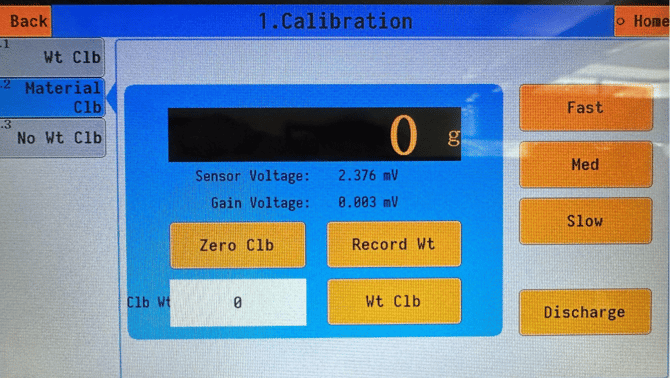
- Place your bucket underneath the discharge chute, and click ‘Fast’ and ‘Discharge’ on the right side to ensure the machine is empty.
- Click Fast and Discharge again to make sure the discharge gate inside the machine is closed and the Fast Feed is turned off.
- Wait for the read-out (where it says 0g) to stabilize, and then press ‘Zero Clb’ to set the zero calibration, and wait for it to complete.
- Place the bucket onto the scale, tare, and weigh out 2000g of coffee into the bucket.
- Load your 2000g into the machine, and press ‘Fast’, and wait for all of the coffee to enter the weighing chamber.
- Wait for the read-out to stabilize and click the ‘Record Wt’ button.
- In the ‘Clb Wt’ white box (underneath ‘Zero Clb’, that shows ‘0’) enter 2000.
- Click ‘Wt Clb’, the readout should read 2000g. You can now click Discharge to empty the coffee, remember to press Discharge once all the coffee has been discharged.
- Click Home to go back to the Home Screen.
You have now calibrated your Precision Fill!