
| Estimated Time | Up to 15 minutes |
| People Required | 1 |
| Difficulty | Easy |
| Tools Required | Electronic scale accurate to 1g, with at least 2kg capacity, a bucket that holds around 2kg of coffee, 2kg of roasted coffee |
Before You Begin
Your Precision Fill is calibrated at the factory, but differences in your electrical supply and small movements during shipping can affect its accuracy. Re-calibrating on site takes a few minutes and makes sure your fill weights are right from the first bag.
This guide applies to both the Precision Fill and the Precision Fill Mini. The screens and buttons are the same on both machines.
Remove the shipping brackets first. The machine cannot weigh correctly while the brackets are fitted. If you haven't removed them yet, follow the Precision Fill / Precision Fill Mini Uncrate and Assembly Guide before continuing.
Make sure the machine is level and stable, with all four feet on the ground. A machine that rocks or leans will give inaccurate readings.
If at any point you are unsure or uncomfortable, stop and contact Technical Service before continuing.
Step 1 — Open the Calibration Screen
Estimated time: less than 5 minutes | 1 person
For a dedicated guide to changing your password, see Changing the Password on Precision Fill.
From the Home Screen, select System Settings in the lower left corner. If asked for a password, enter the default password (0 or 000000, depending on when your machine was manufactured).
Select 1. Calibration, then 2. Material Clb. You'll see a screen like this.
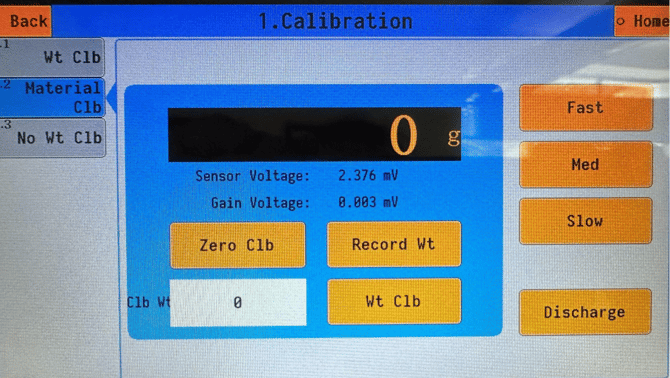
Check the readout before moving on.
If the readout shows 'OFL', the shipping brackets are most likely still fitted. Remove them using the Precision Fill Uncrate and Assembly Guide, then return to this step.
If the readout shows 'ADOFL', stop here and contact Technical Service.
Step 2 — Empty the Machine
Estimated time: less than 5 minutes | 1 person
Place your bucket underneath the discharge chute.
On the right side of the screen, press Fast and then Discharge. This runs the feed and opens the discharge gate, the flap inside the machine that releases coffee into your bag, so that any coffee left inside is emptied into the bucket.
Once the machine is empty, press Fast and Discharge again. This closes the discharge gate and turns off the fast feed. Do not move on until both are off, otherwise coffee will pass straight through the machine during calibration.
Step 3 — Set the Zero Point
Estimated time: less than 5 minutes | 1 person
Watch the readout, this is the weight display that currently shows around 0g. Wait for it to settle on a steady number.
Press Zero Clb and wait for it to finish. The machine now knows what "empty" weighs.
[IMAGE: close-up of the readout and the Zero Clb button]
Step 4 — Weigh Out Exactly 2000g
Estimated time: Less than 5 minutes | 1 person
You'll need an electronic scale that is accurate to 1g.
Tip: Your Precision Fill is only as accurate as the scale you calibrate it to. A scale that measures in steps of 2g, 5g or more will give you inaccurate readings on the Precision Fill, so check your scale before you start.
Place your empty bucket on the electronic scale and tare it, so the scale reads zero with the bucket on it.
Weigh exactly 2000g of coffee into the bucket. Take your time here, the machine will only be as accurate as this reference weight.
Step 5 — Load the Coffee and Record the Weight
Estimated time: Less than 5 minutes | 1 person
Pour your 2000g of coffee into the machine, then press Fast. Wait until all of the coffee has passed into the weighing chamber, the section inside the machine that sits on the load cells and measures each fill.
Wait for the readout to settle, then press Record Wt.
In the white Clb Wt box, underneath Zero Clb and currently showing 0, enter 2000.
Press Wt Clb.
Step 6 — Empty the Machine and Finish
Estimated time: Less than 5 minutes | 1 person
Place your bucket back under the discharge chute and press Discharge to empty the coffee.
Once all the coffee has come out, press Discharge again to close the discharge gate.
Press Back to return to the Home Screen. Your Precision Fill is now calibrated.
What's Next
With your machine calibrated, you're ready to set up your first recipe. Follow How to Create and Modify a Recipe on Precision Fill to set your target weights and dial in your feed settings.
If your fill weights drift over time, or you move the machine, run through this calibration again. If anything doesn't look right, please contact Technical Support.