Uncrating
To uncrate the SOVDA Blend, use a impact/screwdriver drill to undo the screws around the crate, and then by using a crow-bar and a hammer pry open the top lid. You can then use a hammer and crow-bar to carefully remove the sides. Using a forklift, you can carefully lift from the bottom of the Blend.
Open the back cabinet, and you’ll find where to install your Power and Air connections. Your cables will be listed, and match with the corresponding connection.
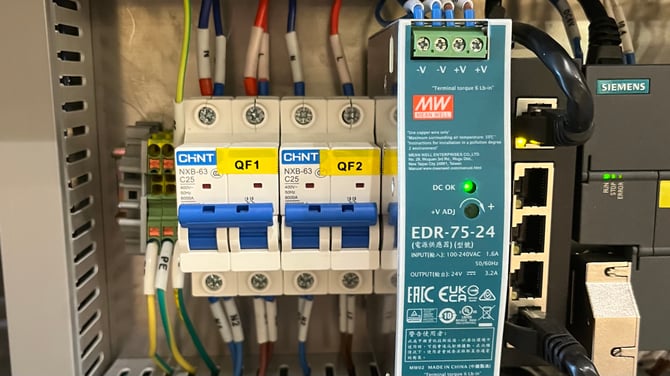
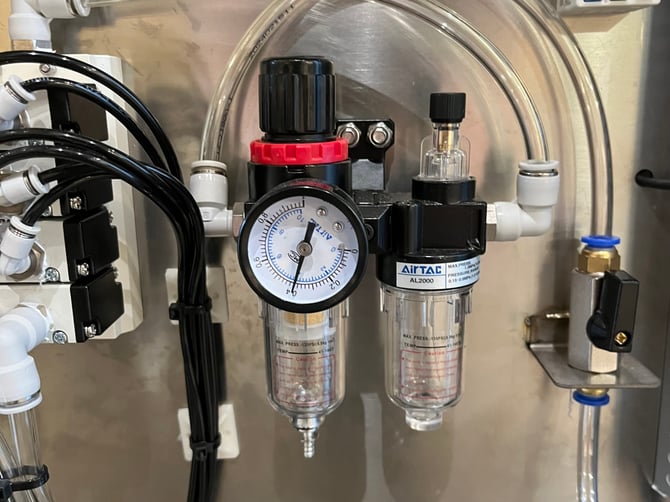
On the front of the SOVDA Blend, remove the panels by lifting and twisting the handle. You’ll find two blue fuses/breakers you’ll need to flip, as well as adjusting the air regulator at the bottom of the cabinet. You should set this to 0.4mpa.
Your SOVDA Blend may have also shipped with the emergency button on the front activated. Twist to disarm.
Operation & Settings
When your SOVDA Blend turns on, you’ll be greeted with the Home screen, which will allow you to blend in two modes: Manual or Automatic (Auto).
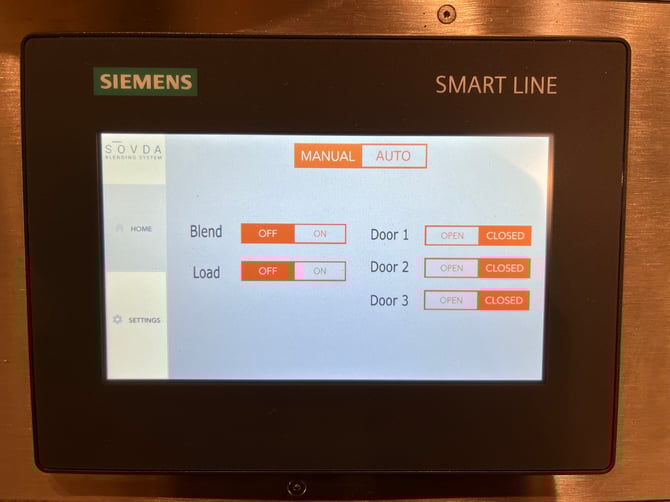
In the Manual mode, you’ll have on-off settings, as well as be able to individually control each door to unload. The doors go from left to right when facing the screen. Door one on the left hand side, or two on the back of the SOVDA Blend, and door three at the right.
Automatic mode (Auto) will run through the sequence of loading, blending and unloading depending on your settings in the settings Menu. When you press Load & Blend this sequence will start.
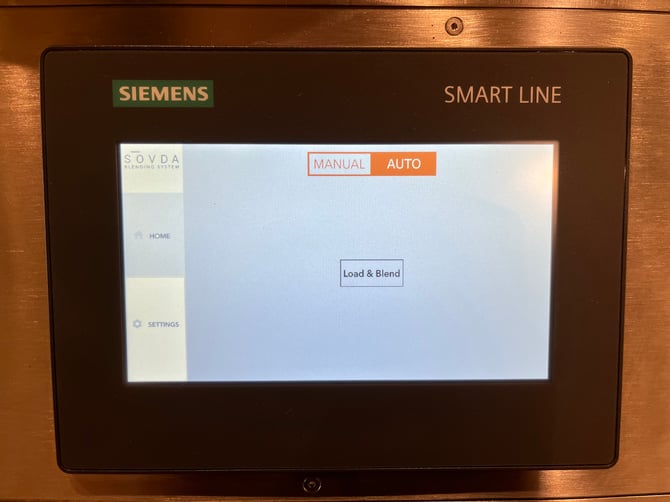
In the Settings Screen you’ll find the settings for both the manual and automatic modes.
At the top of the screen, you’ll see a row of timers. These timers correspond to the three primary phases of the SOVDA Blend process:
-
Load Time – Determines how long the machine spends lifting beans into the blending chamber. Adjusting this value changes the volume of beans loaded before blending begins.
-
Blend Time – Sets the duration of the mixing process. Longer blend times result in a more thorough and uniform blend, while shorter times are useful for faster throughput or smaller batch sizes
-
Unload Time – Controls how long the machine spends emptying the blended coffee from the chamber. Increasing this time can help ensure complete discharge, especially with larger batch sizes.
Each timer can be customised to match the needs of your production environment, helping you optimise efficiency and achieve reliable, repeatable blending results. As you adjust these values, consider the characteristics of the coffees you’re working with and the batch size required.
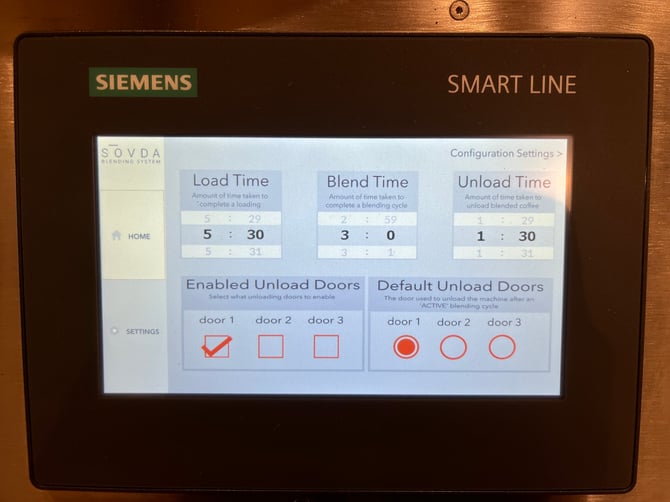
Enabled Unload Doors lets you choose which doors are active on the SOVDA Blend. This is useful in situations where certain doors aren’t accessible or practical to use. For example, if the back of the machine is positioned against a wall, you may never need to operate Door 2. In that case, you can simply uncheck Door 2 to disable it. Once a door is disabled, it will no longer appear as an option on the Home Screen, and you won’t be able to manually open it during operation.
Default Unload Doors sets which door or doors the machine will automatically open at the end of the blending cycle. These defaults are used specifically by Automatic Mode, ensuring the machine always unloads through the correct door(s) once blending is complete.
Configuration Settings
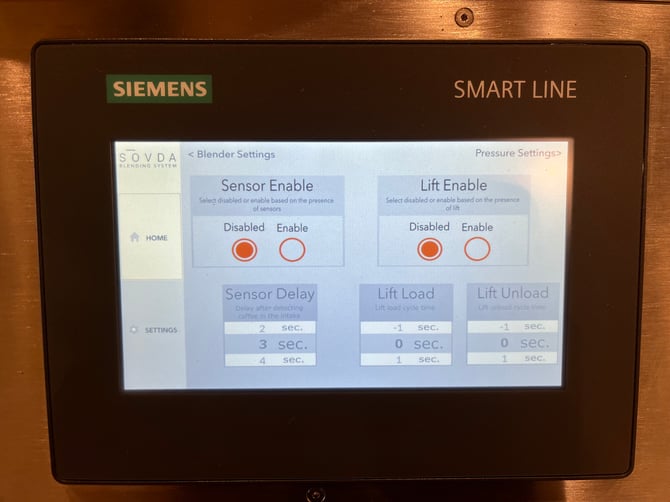
Lift Enable allows you to activate the lift function when your Blend hopper is equipped with a Y-valve that feeds coffee to an additional piece of equipment, like a Precision Fill for example.
When this option is turned on, the system will incorporate lift operation into the automatic cycle. The Lift Load and Lift Unload timers determine how long the lift runs during each phase, and these values will generally mirror the timing used in your Universal Control Box settings.
Sensor Delay defines how long the lift continues to run after the sensors stop detecting coffee in the line. This added delay helps guarantee that any remaining beans are fully cleared from the system.
Pressure Settings
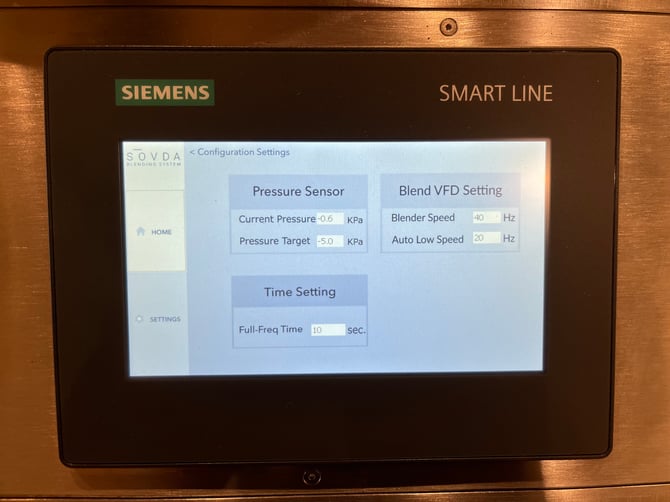
Pressure Sensor, Time Settings and Blend VFD settings are settings that should only be adjusted if instructed to by one of our technicians.
Maintenance
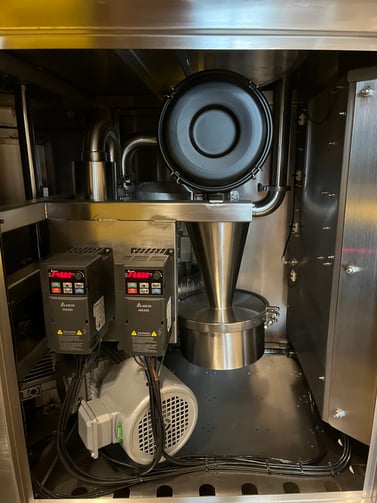
Inside the SOVDA Blend, you’ll find a cyclone and a filter element that require regular cleaning to maintain proper airflow and suction. The procedure is almost identical to the maintenance routine for the SOVDA Vacuum Box, so if you’re familiar with that system, the process will feel very familiar.
The internal components include a cyclone chamber and a filter, both of which function much like the cyclone and dust collection systems found on many coffee roasters. To begin servicing the cyclone, locate the tri-clamp that secures the collection container at the bottom. Release the tri-clamp, remove the container, and discard the accumulated chaff or fine coffee particles.
For the filter assembly at the top (the black canister held in place by four clamps), release the clamps and remove the filter. Cleaning this component should always be done in a well-ventilated area, preferably outdoors, and while wearing a dust mask to avoid inhaling fine particles. Using compressed air, gently but thoroughly blow out the filter to remove dust and buildup.
After cleaning, reassemble the cyclone and filter components securely, ensuring all clamps are properly tightened. Regular maintenance will help the SOVDA Blend maintain consistent suction performance and extend the lifespan of the vacuum system.