
Raising the Fuses
First, ensure your Pearl Mini is off, and either unplugged, or isolated from the power.
This first step is critical, the electrical cabinet is a dangerous environment when live, and can cause fatal consequences.
Using the key (included in your blue envelope), open the bottom hatch of your Pearl Mini to open the electrical cabinet. You'll need to unlock all four corners, and the hatch will come off.

You'll see to the right side of the electrical cabinet two small fuses/breakers. Flip these so they are both in the up position.

Place the hatch back on and lock the cabinet and plug the machine in. Locate the two power buttons on the right side of the touchscreen.

Press the green button on the left to power on your Pearl Mini—the machine will begin its startup process. Note that the right button (that will glow red when the Pearl Mini is off) should only be used as an Emergency Stop only.
Unlocking the Software
Once loaded, please photograph the displayed code and share it with your SOVDA Representative, it will look something like this:
Keep your Pearl Mini powered on while waiting for the unlock code. Restarting or powering off the Pearl Mini before entering the code will generate a new code, and invalidate your old code.
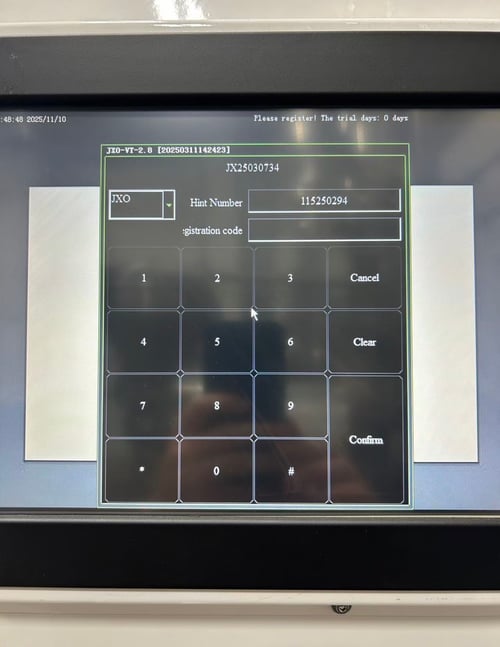
Enter the unlock code provided by your Technical Brand Ambassador and click confirm. Your Pearl Mini will take 1-2 minutes to fully load. Once loaded you'll be greeted with a Home Screen, click 'OFF' on the right-hand side.
