
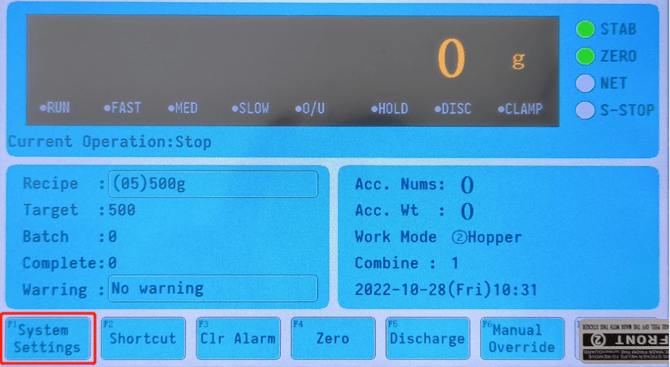
The Precision Fill has a “Set-Bat” function that allows you to specify the number of bags to fill, this is your batch count. Once the set number of batches is completed, the machine will automatically stop filling. To resume filling after a batch is complete, tap “Clr Alarm” on the main menu.
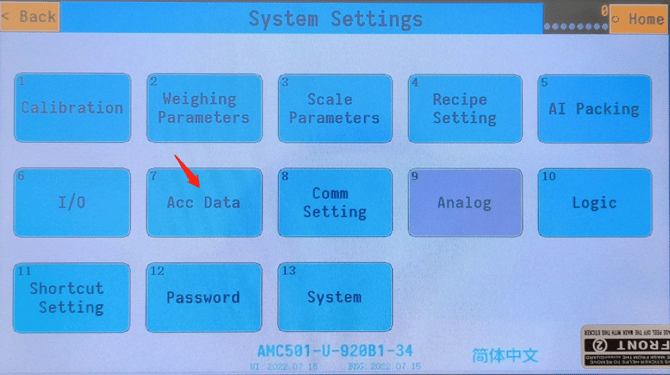
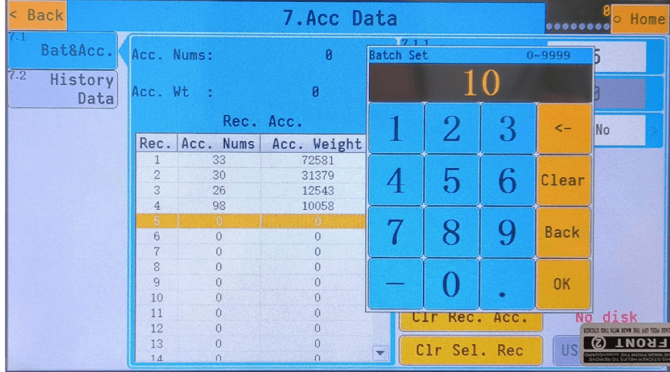
To set your batch, go into System Settings, go to ‘7. Acc Data’, and enter the number of bags under ‘7.1.1 Batch Set’.
Note: If Batch Set is set to 0, the function is inactive. The Batch feature is only activated when the value is greater than 0.
 |
 |
 |
 |
Once set, you’ll be able to see the total Batch number, and the amount you’ve completed underneath your Recipe selection, and above your alarms/warning.