Ensure that the Hopper is levelled and assembled according to the Manual before the calibration process.
It is critical that you have removed the Shipping Brackets before calibration.
- With the scale off, press the '#' button and hold while switching on the scale. Once '999999' appears, let go of the '#' button. You should see 'D__001'.
- Using the '#', scroll through the menu until 'AdLoad' screen appears (4th menu)
- Place a 1kg calibration weight (recommend) until the hopper and press the 'Tare' button. You can use anything that you know the accurate weight of.
- You'll now need to enter the weight of weight of what you've placed in the hopper. For this example we'll use a 1kg calibration weight. Press the 'Tare' button to scroll to the number before the decimal point starts blinking, and press 'Zero' to increase the number to 1.
- Press the '#' and the screen will display 'End'.
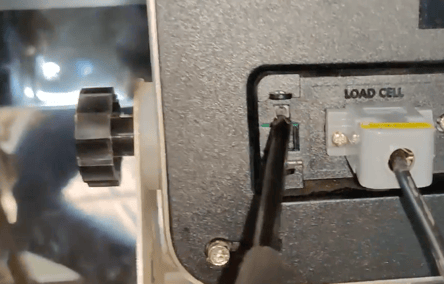
- Using a screwdriver (or any thin object), press the button located on the back of the display on the left-hand side.
- Your scale should now display the same weight that you have calibrated it too.